Chapter 5.8.1
Radios
Updated 23 Sep 2026 · Grant
Trigg's patrol radios are Icom handhelds that work on two networks at once: the Telstra mobile network for the Metro channels, and VHF for line-of-sight channels. The radio carries two channels at the same time, one on each transmit button. A radio induction is required before you patrol.
Which channel to use
Broadcast all patrol operations on Metro Wide so Surfcom monitors and records them. Use VHF or your club channel for admin, training and other non-patrol traffic. Formal radio protocols apply on every channel, every time.
Start up
Take the radio off the charger.
Turn on with the On/Off/Volume knob and set the volume.
Wait while it connects to the Telstra network — up to 40 seconds.
Check the two channels shown, then hold CLR to lock the keypad.
How to transmit
The display shows two channels. The top line is the channel on the top (large) PTT, and the lower line is the channel on the bottom (small) PTT. To swap them, press and hold FUNC.
Button | Channel | What it is |
|---|---|---|
Top PTT — large | Metro Wide | Telstra network. Surfcom monitors this channel. Listen before you speak; a beep confirms the channel. |
Bottom PTT — small | VHF1 – Ops | VHF, line of sight only. Use for club communication. Neighbouring clubs may be heard. |
On patrol
Keep Metro Wide as the top channel, on the large PTT.
Listen before speaking — several members can talk on the Telstra channels at once.
Use “Over” or “Out” so others know when the channel is clear, and keep to standard pro-words.
Surfcom monitors only the Area Wide channels day to day, and may move the club to another channel during a major incident.
VHF Marine channels
Only use the VHF Marine channels when directed to by Police, Marine Rescue or Surfcom. Improper use may result in fines.
Metro channels
Channel | What it is |
|---|---|
1 | Metro Wide — Surfcom monitored |
2 | Metro Ops |
3 | Metro ERT |
19 | Trigg Island — club channel |
01–05 | VHF Ops — line of sight |
06–18 | VHF Marine — when directed |
The controls
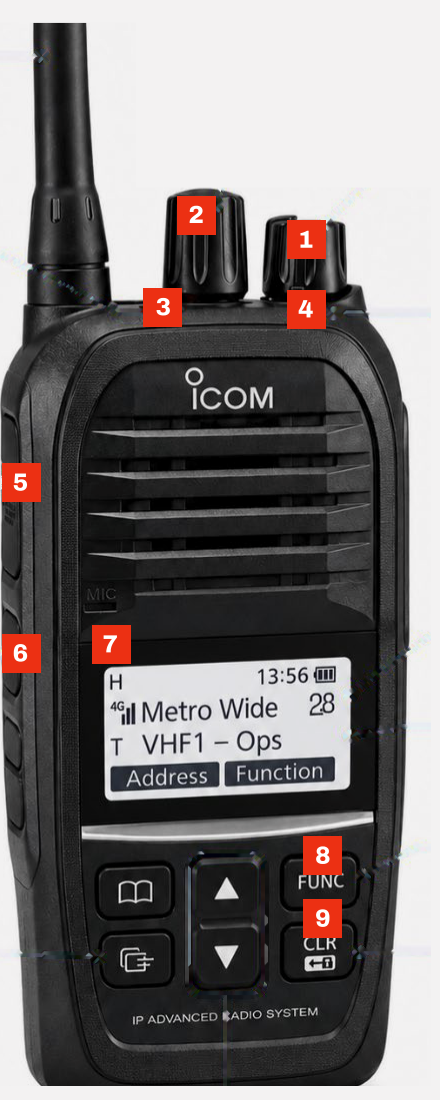
# | Control | What it does |
|---|---|---|
1 | On/Off/Volume | Turn on, set volume |
2 | Channel Selector | Changes the top channel |
3 | Emergency Distress | Distress button |
4 | Indicator | Red transmitting, green receiving |
5 | Top PTT (large) | Transmits on the top channel |
6 | Bottom PTT (small) | Transmits on the lower channel |
7 | Display | The two channels you are on |
8 | FUNC | Press and hold to swap the two channels |
9 | CLR | Press and hold to lock / unlock the keypad |
When you finish
Turn the radio off, make sure it is dry, and put it back on the charger.
Where this comes from
SLSWA Icom Radio Guide v1.1. A radio induction is required before patrolling — ask your Patrol Captain if you have not done one.